Single Customer API
Introduction
Emulate's Single Customer API allows electricity retailers to enable spot price optimization for their customers by integrating the Emulate service in their web or mobile applications. The service is offered on a per-customer basis, with each end customer identified by a unique token.
With the Single Customer API, retailers authenticate customers through their internal database and generate tokens that grant access only to details of a single customer. With this token, the retailer's web or mobile application can query the Emulate service using the Single Customer API.
The Emulate API allows retailers to display information about their customers' power consuming devices and spot price optimization settings in customer-facing web and mobile applications. This data can be used in user interfaces to present the consumption and optimization details in a graphic way.
Integration with the Emulate service via the Single Customer API
Access to the Emulate API is based on the retailer's authentication of its customers. The retailer extends their own web application or API with an additional endpoint that obtains a token for the Emulate Single Customer API. This token can then be used in a mobile or web application to make requests directly to the Emulate API. See the image below for the integration flow.
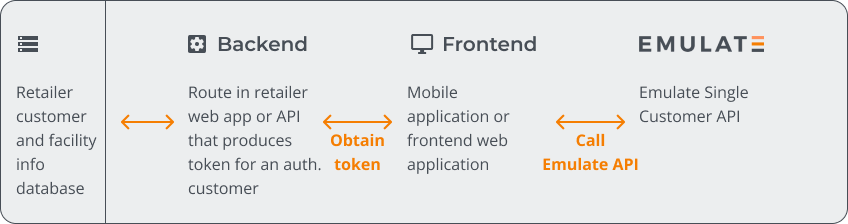
The mobile or web application can query the Emulate service via the API to obtain information about onboarded devices, configure their spot price optimization, and get information about consumption and savings. To simplify device onboarding, Emulate provides an embeddable UI for signing in to a device. This way, the retailer does not need to use multiple manufacturer-specific login flows.
Make a request to the Emulate Single Customer API
Before querying the Emulate API, generate a JSON Web Token per each customer you plan to onboard. For details on JWT generation, see Authorization.
The Emulate API supports the following environments:
To make a request to the Single Customer API, set up the HTTP Authorization header using the Bearer mechanism as follows. The token variable contains the JSON Web Token:
For testing purposes, you can use the Emulate staging environment with test data to configure your application:
Troubleshooting
If you get a 403 (access denied) error in the response to your Single Customer API request, check the following:
- The JWT is syntactically valid. Validate your token by pasting it in the JWT tool.
- The signing algorithm is RS256.
- The key corresponds to the environment you are using.
- The key is generated for the Single Customer API, not the Retailer API.
- The correct retailer ID is used.
- The token has not expired